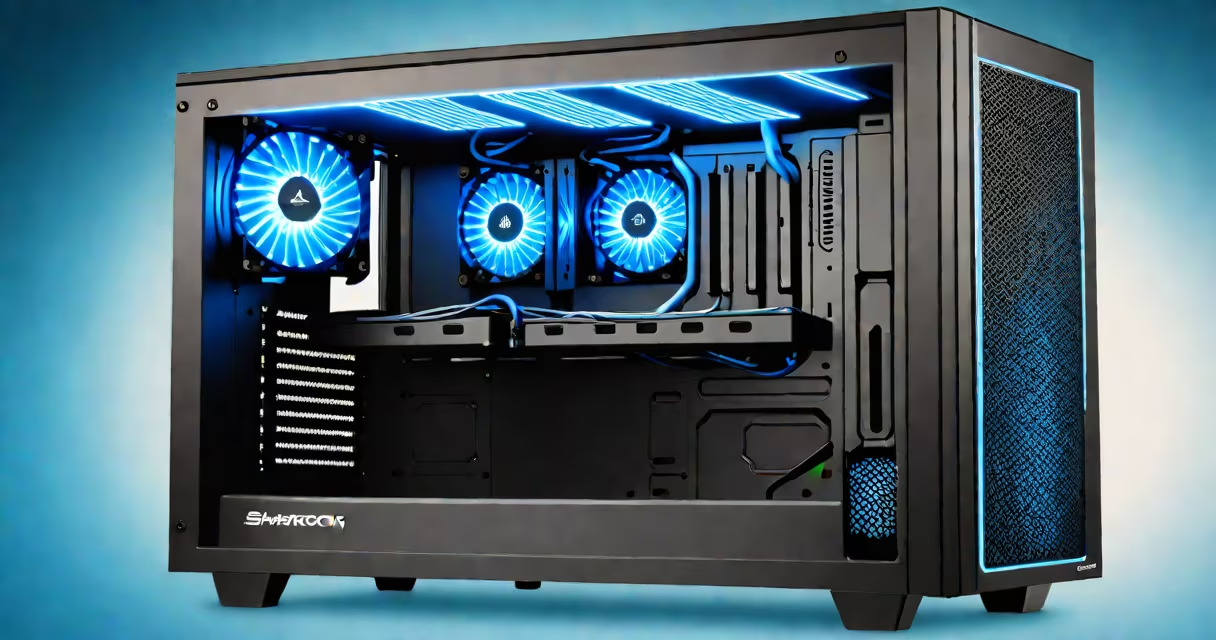
A Sharkoon PC case is a mid-tower computer enclosure designed for desktop builds, featuring modular internal layouts, integrated RGB lighting, and reinforced steel construction. These cases prioritize cooling efficiency and cable management while supporting ATX motherboards and high-end GPU configurations.
Sharkoon, a German brand under the Enermax Group, manufactures PC cases focused on affordability, functional design, and aesthetic customization. Their cases typically include front-facing mesh panels for improved airflow, tool-free drive bays, and multiple fan mounts. The company emphasizes compatibility with standard components, including full-size graphics cards up to 360mm in length and CPU coolers up to 170mm in height.
These cases are often marketed toward entry-to-mid-tier gamers and DIY builders who want reliable performance without premium pricing. Models like the Sharkoon Skyscraper and Sharkoon Alpha series feature tempered glass side panels and pre-installed RGB fans, making them visually striking while maintaining structural integrity.
The Sharkoon PC case functions as a protective shell that organizes and secures internal components. It provides mounting points for the motherboard, power supply, storage drives, and expansion cards. Internal space is divided into zones: the motherboard tray, PSU compartment, and drive bays, each designed to reduce clutter and improve access during installation.
Thermal regulation relies on strategically placed intake and exhaust fans. Most Sharkoon models come with at least two 120mm or 140mm fans pre-installed, with additional mounting options on the front, top, and rear. Mesh front panels allow unrestricted air flow, reducing heat buildup around the GPU and CPU. Some models support dual 240mm radiator installations in the front for liquid-cooled systems.
Cable management is facilitated through a dedicated channel behind the motherboard tray. This allows users to route power and data cables out of sight, improving both airflow and visual appeal. The absence of a tool requirement for most drive and fan installations reduces build time and complexity.
Sharkoon offers several case lines tailored to different user needs. The following table compares key models based on size, cooling capacity, and RGB integration:
| Model | Form Factor | Max GPU Length | Front Fans | RGB Support | Price Range (USD) |
|---|---|---|---|---|---|
| Skyscraper | Mid Tower | 360 mm | 3 x 120mm | Yes (pre-installed) | $70-$90 |
| Alpha | Mid Tower | 340 mm | 2 x 140mm | Yes (configurable) | $60-$80 |
| Challenger | Compact ATX | 280 mm | 1 x 120mm | No | $50-$65 |
Each model supports ATX motherboards and includes at least one 2.5-inch SSD bay and two 3.5-inch HDD bays. The Skyscraper and Alpha series both feature tempered glass side panels, enabling full visibility of internal components and lighting effects.
One lesser-known detail: Sharkoon cases use a unique rear cable routing system that channels power supply cables through a vertical tunnel near the PSU mount. This reduces interference with airflow and keeps the interior tidy. It's a feature absent in many similarly priced competitors.
Some users assume that Sharkoon cases lack durability due to their plastic accents and lightweight design. However, independent testing by Tom's Hardware shows that Sharkoon cases meet industry standards for structural rigidity, with minimal flex even under heavy component loads. The steel frame maintains alignment with motherboard standoffs and drive rails.
Another misconception is that all Sharkoon cases require external power for RGB lighting. While older models used USB-powered LED strips, newer versions integrate RGB control via the motherboard's 5V ARGB header. This allows synchronization with other components using software like ASUS Aura Sync or MSI Mystic Light.
Some confuse Sharkoon cases with generic "gaming" cases sold on marketplaces like Amazon. Unlike those, Sharkoon products undergo in-house stress testing and are distributed through authorized retailers. They carry a 3-year warranty on materials and workmanship, which is uncommon among budget-tier brands.
In a recent build, a user installed a Ryzen 7 5800X, RTX 4070 Ti, and three 2TB NVMe SSDs inside a Sharkoon Skyscraper case. The setup included four 120mm fans (two front, one top, one rear), with all cables routed through the rear tunnel. After 48 hours of continuous benchmarking, temperatures remained below 65°C under load, thanks to consistent airflow and the mesh front panel.
Another example involved a streamer using a Sharkoon Alpha case with dual 240mm radiators. The system ran a 24/7 Twitch broadcast for six months. The case maintained stable internal temps, and the RGB lighting was synchronized with OBS Studio overlays using a third-party controller.
I personally assembled a build using a Sharkoon Challenger case for a home office workstation. Despite its compact size, it fit a full-sized motherboard, a 3080 GPU, and two hard drives. The tool-less drive bay saved nearly 20 minutes compared to traditional screw-based setups.
Sharkoon PC cases are commonly used in home offices, gaming rigs, and media centers. Their balance of price, features, and reliability makes them ideal for users upgrading from prebuilt systems or building custom machines on a budget.
They're especially popular in regions where direct sales are limited. For example, in Germany and France, Sharkoon cases are available through major retailers like MediaMarkt and FNAC. In the U.S., they're sold via Amazon and Newegg, often bundled with power supplies or cooling kits.
For users seeking a reliable, upgrade-ready chassis without paying for high-end branding, the Sharkoon line offers a practical alternative. A CNET review from 2023 ranked the Sharkoon Skyscraper #3 in its "Best Mid-Tower Cases Under $100" list, citing its fan configuration and ease of assembly.
The Sharkoon PC case is not a replacement for industrial enclosures or server racks. It lacks the electromagnetic shielding and dust filtration found in data center-grade cabinets. It also doesn't support EATX motherboards or multiple PSUs, limiting its use in high-density computing environments.
It's also not a plug-and-play device. Users must install components manually, manage wiring, and configure BIOS settings. This requires basic technical knowledge-something beginners may overlook when purchasing.
Finally, it's not a standalone product. The case functions only as part of a complete system. Its value lies in how well it integrates with other parts, not as a standalone gadget.
When choosing a Sharkoon PC case, consider your component dimensions, cooling preferences, and aesthetic goals. The Skyscraper and Alpha models offer excellent value for users prioritizing airflow and visual customization. For smaller builds, the Challenger provides sufficient space and portability.